Direct Answer: What You Need to Know Today
Instagram’s privacy framework is governed by a unified Meta Data Policy that covers Instagram, Facebook, and Threads.
The platform operates on a “personalized experience” model, meaning it collects vast amounts of user data—including content, connections, usage patterns, and device metadata—to serve targeted advertisements and develop internal products.
The Core Policy (2026 Summary):
- Data Collection: Instagram logs every post, like, comment, message, and search, alongside technical data such as IP addresses and device identifiers.
- Ownership: You own your content, but by using the service, you grant Meta a non-exclusive, royalty-free, worldwide license to host, distribute, and modify that content.
- Recent Shifts: In 2024, Meta updated its policy to allow the use of public posts and captions to train its Generative AI models. In 2026, the platform introduced advanced “Teen Accounts” that default to private and include automated alerts for parents regarding high-risk search behavior.
1. Profile View Notifications
Many users wonder if Instagram notifies someone when they view their profile. The good news is that Instagram does not notify users when their profile is viewed.
This means you can browse profiles without worrying about alerting others. However, keep in mind that users can see who views their Stories and Reels, so if you’re concerned about privacy, be mindful of what you share in those formats.
2. Privacy Settings
Adjusting your privacy settings is one of the best ways to protect your account. Here are some key features:
- Private Account: Switching to a private account allows you to control who sees your posts. Only approved followers can view your content.

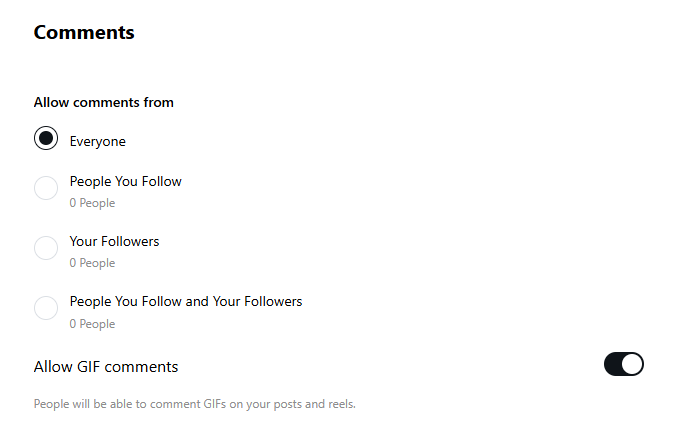
- Comment Control: You can manage who can comment on your posts, restricting it to followers or specific users.
- Story Settings: Customize who can view your Stories. You can create a “Close Friends” list for sharing more personal content.
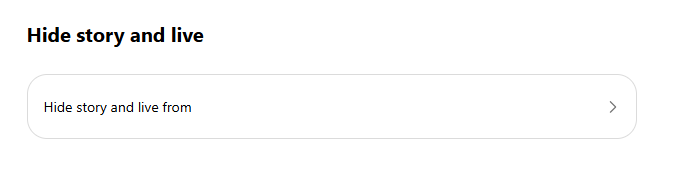
These settings empower you to maintain control over your online presence.
Step-by-Step: Hardening Your Privacy Settings
To regain control over your digital footprint, you must move beyond the basic “Private Account” toggle and address the technical permissions granted to the mobile application.
Disabling the “Big Three”: Microphone, Camera, and GPS
Instagram requires access to your microphone and camera to function as a content creation tool, but leaving these permissions active at all times creates a continuous data stream.
- iOS/Android: Navigate to Settings > Privacy > Microphone (and Camera) and toggle Instagram to OFF.
- Operational Tip: Only enable these permissions when actively recording a Story or Reel, and disable them immediately afterward to ensure the app is not accessing sensors in the background.
- GPS Location: Disable precise location tracking under Settings > Privacy > Location Services; set Instagram to “Never” or “While Using” to prevent the app from logging your movements via Wi-Fi signals and cell towers.
How to Manage Activity Status and “Last Seen”
The “Activity Status” feature notifies mutual followers and those you message when you are active on the platform. To browse invisibly:
- Open Instagram Settings.
- Navigate to Privacy > Activity Status.
- Toggle Show Activity Status to OFF. Note: This is a reciprocal setting; disabling your status prevents you from seeing the active status of others.
Cleaning Your “Link History” and In-App Browser Cache
Instagram’s in-app browser tracks every link you click within the app, maintaining a “Link History” for up to 30 days to improve ad targeting.
- To Clear: Go to Settings > Browser Settings.
- To Opt-out: Toggle Allow Link History to OFF to stop the app from archiving your external browsing activity.
Revoking Third-Party App Permissions
Many users unknowingly grant long-term data access to third-party “analytics” or “follower-tracking” apps. These apps often continue to scrape data even after you stop using them.
- Navigate to Settings > Security > Apps and Websites.
- Select Active and click Remove for any service you do not recognize or no longer use.
Feature Breakdown: Privacy Mechanics by Tool
Privacy on Instagram is not binary; different features offer varying levels of data exposure.
Stories vs. Posts: Who Can Really See Your Content?
Standard posts remain on your profile until deleted and are searchable via the Explore tab or hashtags if your account is public. Stories expire after 24 hours, making them feel more private, yet they remain on Meta’s servers for up to 90 days after expiration.
Instagram Direct (DMs): Vanishing Mode and Read Receipts
DMs are the primary mode of private communication, but they are subject to automated processing for safety and advertising context.
- Vanishing Mode: Swiping up in a chat activates a mode where messages disappear after they are viewed and the chat is closed.
- Read Receipts: These can now be toggled off in chat settings, allowing you to read messages without notifying the sender.
Collaborative Posts: Shared Analytics Risks
When you co-author a “Collaborative Post,” you are sharing your audience data with another entity. Both collaborators can see the usernames of everyone who liked or commented, effectively merging the “engagement data” of two separate audiences.
The “Close Friends” Strategy for Segmented Sharing
The Close Friends list allows you to share Stories and Reels with a curated group. This is an essential “Opsec” (Operations Security) tool for users who want to maintain a public profile for professional reasons while sharing personal content with a trusted inner circle.
3. Protecting Your Account
Account security is vital in today’s digital landscape. Here are some essential tips:
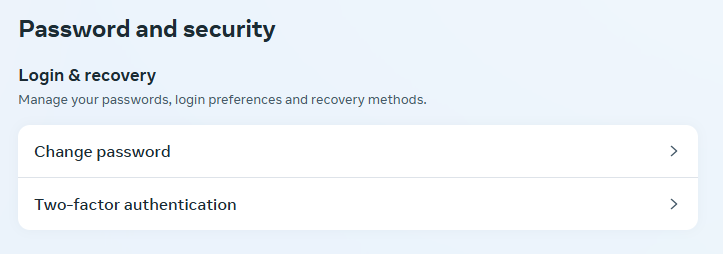
- Enable Two-Factor Authentication: This adds an extra layer of security by requiring a code sent to your phone in addition to your password.
- Use a Strong Password: Create a unique password that includes a mix of letters, numbers, and symbols. Avoid using easily guessed information like birthdays.
- Be Cautious with Third-Party Apps: Only use trusted apps that integrate with Instagram. Many third-party apps may request access to your account, leading to potential security risks.
Taking these precautions can significantly reduce the likelihood of unauthorized access.
4. Hidden Features
Instagram is packed with features that can enhance your experience. Here are a few you might not know about:
- Mute Accounts: If you want to reduce your feed clutter without unfollowing someone, you can mute their posts or Stories.
- Save Posts to Collections: You can save posts you like to private collections for future reference, making it easier to find inspiration later.
- Close Friends List: Use this feature to share Stories with a select group of people, allowing you to keep certain content more private.
Exploring these hidden features can make your Instagram experience more enjoyable and tailored to your needs.
5. Scam Awareness
Instagram is a platform where scams can proliferate. Here’s how to recognize and avoid them:
- Phishing Attempts: Be wary of messages asking for personal information or login details. Legitimate companies will never request sensitive information via direct message.
- Fake Accounts: Scammers often create fake profiles to impersonate others. Check for verification badges and suspicious behavior before engaging.
- Report Suspicious Activity: If you encounter a scam or suspicious account, report it to Instagram. Use the “Report” feature to help keep the platform safe for everyone.
Staying informed about these threats is crucial to protecting your account and personal information.
How it Works: The Technical Side of Instagram Tracking
Understanding the mechanics of Meta’s tracking reveals why “deleting” an app is often insufficient.
Device Fingerprinting: Beyond the IP Address
Meta uses “Device Identifiers” to uniquely tag your hardware. Even if you use a VPN to hide your IP address, Meta can identify your device through battery levels, signal strength, available storage space, and even specific mouse or touch-screen movements.
Cross-Site Tracking: How the “Like” Button Follows You
The “Meta Pixel” and embedded “Like” buttons on external websites act as beacons. Even if you are not logged into Instagram, these tools report your browsing habits—such as what you buy or search
for on a retail site—back to Meta to build a “shadow profile”.
Metadata (EXIF) Explained: Why Your Photos Reveal Your Location
Every photo taken with a smartphone contains EXIF data, which can include the exact GPS coordinates, time, and device model used to take the shot. While Instagram often strips this before displaying the photo to others, Meta retains the original metadata for its own location-tracking databases.
The 90-Day Deletion Lag: Is Your Data Actually Gone?
When you delete a post or your entire account, Meta initiates a deletion process that can take up to 90 days to complete across its servers and backup systems. During this window, the data is invisible to the public but remains accessible to Meta for legal requests or investigations.
Business & Creator Compliance: API Requirements
Businesses using Instagram’s API must adhere to strict transparency standards to avoid account termination.
Meta’s Platform Terms for App Developers
Any app connecting to the Instagram API must have a clear, publicly accessible privacy policy that explains exactly what data is being processed. Developers must retain all versions of their privacy policies to provide to Meta upon request.
Prohibited Data Uses: Surveillance and Profiling
Meta explicitly forbids businesses from using platform data for:
- Surveillance: Tracking individuals for law enforcement or private investigation.
- Eligibility Determinations: Using data to decide on housing, employment, or credit.
- Discrimination: Processing data based on protected attributes like race or religion.
Protecting the Most Vulnerable: Teen Safety & Supervision
In response to global legal scrutiny, Instagram has implemented “Safety by Design” for minors.
Default Private Settings for Minors
Users under 16 (or 18 in certain regions) are automatically defaulted into private accounts upon registration. This restricts who can see their followers, the people they follow, and who can comment on their posts.
The Family Center: Setting Limits and Monitoring Activity
Parents can link their accounts to their teen’s account to:
- Set daily time limits and schedule breaks.
- See who their teen follows and who follows them.
- Receive notifications if the teen reports an account or piece of content.
Sextortion Protection: How NCMEC Tools Work
Instagram collaborates with the National Center for Missing and Exploited Children (NCMEC) to stop the spread of intimate images. Tools like “StopNCII” allow teens to proactively hash intimate images so they can be identified and blocked by Meta’s automated systems before they are ever posted.
2026 Suicide and Self-Harm Search Alerts
In February 2026, Meta launched a feature that alerts parents via the Family Center if their teen repeatedly searches for content related to suicide or self-harm. This is part of a broader push to provide early intervention for youth mental health crises.
Privacy Myths and Misconceptions
Misinformation regarding Instagram’s policies often goes viral, leading to “privacy hoaxes.”
The “Copyright Status” Hoax
A frequent viral post claims that “everything you’ve ever posted becomes public from tomorrow” unless you repost a specific legal disclaimer. This is a hoax. Reposting a block of text on your feed has no legal standing and does not override the Terms of Use you agreed to when signing up.
“Is Instagram Listening?”
While many users report seeing ads for topics they only spoke about aloud, Meta’s executives have repeatedly denied using the microphone for ad targeting. They attribute this phenomenon to sophisticated behavioral modeling—where their algorithms predict what you might want based on your friends’ activity and your own browsing history—rather than active audio surveillance.
The Myth of Anonymous Story Viewing Apps
Third-party websites that claim to let you view Instagram Stories anonymously are significant security risks. These apps often scrape your data or serve as front-ends for malware; the only official way to view content is through the Instagram app or website while logged in.
Advanced Privacy Opsec: For the High-Security User
For those requiring maximum privacy, the standard app experience is often insufficient.
App vs. Browser: Why Logging Off Matters
The Instagram mobile app is a “data sponge,” collecting sensor data that the web version cannot access. High-security users should use Instagram via a mobile or desktop web browser (like Brave or Firefox) and log out after every session to prevent cross-site tracking.
Compartmentalization: Burner Emails and Alias Personas
Avoid using your primary email or phone number for Instagram. Using a burner email and an alias name creates a layer of “compartmentalization,” making it harder for Meta to link your social activity to your real-world identity or financial accounts.
Metadata Stripping: Essential Tools Before You Upload
Before uploading a photo, use a metadata stripper app to remove EXIF data. This ensures that even if a “glitch” occurs in Meta’s system, the original file does not contain your GPS coordinates.
Troubleshooting Privacy Issues
What to Do if Your Account is “Shadowbanned”
“Shadowbanning” is an unofficial term for Meta’s practice of reducing the reach of accounts that violate vague “community guidelines”. If your engagement drops suddenly:
- Check your Account Status in settings.
- Remove any hashtags that may be flagged as spam.
- Cease using third-party automated tools, which Meta identifies as “non-genuine engagement”.
Reporting Non-Consensual Image Sharing
If someone posts your private information or intimate images, use the “Report” tool directly on the post. Meta prioritizes these reports, especially those involving minors or “sextortion”.
Recovering Your Data via “Download Your Data”
Under GDPR and CCPA, you have the right to see what Meta knows about you.
- Go to Settings > Your Activity.
- Select Download Your Information.
- Meta will email you a file containing every message, comment, and like you have ever made.
FAQ
Does deleting my account immediately remove all my photos?
No. While they disappear from public view, it can take up to 90 days for Meta to remove them from their active servers and backups.
Can Instagram see my camera when I’m not using the app?
Meta states they only access the camera when the app is “operating,” but for safety, you should disable camera permissions in your phone’s system settings when not in use.
How do I opt-out of Meta’s AI training models?
Users in certain regions (like the EU/UK) can use a “Right to Object” form in the Settings > About > Privacy Policy section. However, Meta is not always legally obligated to honor these requests in all jurisdictions.
Are my private DMs read by Meta employees?
In standard cases, no; they are processed by automated systems. However, Meta has admitted in the past to hiring contractors to review audio recordings from Messenger to improve AI accuracy.
Can businesses see who viewed their profile?
No. Instagram does not provide users or businesses with the identities of people who simply view their profile or photos.
What is the difference between archiving and deleting?
Archiving hides a post from your profile but keeps all likes and comments for you to see privately. Deletion removes it permanently (after the 90-day window).
Does Instagram share my phone number with advertisers?
Meta states they do not share information that “directly identifies you” (like your phone number) unless you give specific permission, though they use it internally for ad targeting.
How can I stop people from seeing my “Last Active” status?
Toggle off “Show Activity Status” in your Privacy Settings.
Conclusion
Instagram can be a fun and engaging platform, but understanding privacy settings and being vigilant about safety is essential.
By taking advantage of privacy features, securing your account, exploring hidden functionalities, and being aware of scams, you can enjoy your Instagram experience while protecting your online presence. Stay safe and happy scrolling!